

If you are planning an Essential Eight rollout for a small business, two things are already clear. First, cyber security risk is no longer just an enterprise problem. Second, most small and medium businesses do not have the budget, time, or internal capability to tackle every possible framework at once. That is exactly why the Essential Eight remains such a useful baseline. It gives businesses a prioritised set of controls that materially reduce common cyber risk without pretending that one document solves everything.
Table of contents: This guide explains what the Essential Eight is, why it matters to Perth SMBs, what Level One really means, how to sequence implementation, and where businesses usually get stuck.
The problem is that many businesses still approach it the wrong way. They either ignore it because it sounds too government-focused, or they turn it into a paperwork exercise with no operational follow-through. Neither approach works. In 2026, the practical question for Perth businesses is not whether the Essential Eight is relevant. It is how to implement it in a proportionate, commercially realistic way that improves resilience without overwhelming the team.
This article focuses on that practical path. We will look at what the Essential Eight actually is, why Level One is the right entry point for many SMBs, how to sequence the work, and what it looks like when a managed IT partner turns a cyber framework into day-to-day risk reduction.
What the Essential Eight actually is
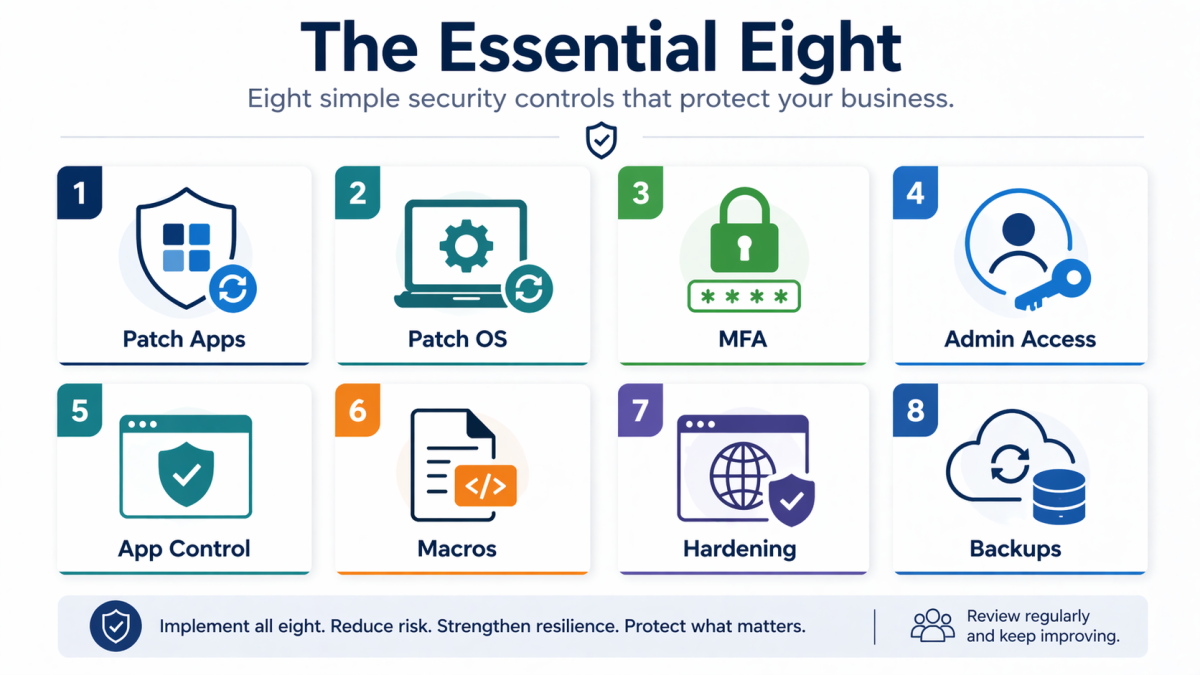
The Australian Signals Directorate’s Australian Cyber Security Centre describes the Essential Eight as a baseline set of eight mitigation strategies that make it much harder for adversaries to compromise systems. That wording matters. The goal is not theoretical perfection. The goal is to make compromise harder, reduce common attack paths, and improve recoverability when incidents do happen.
The eight controls are:
- patch applications
- patch operating systems
- multi-factor authentication
- restrict administrative privileges
- application control
- restrict Microsoft Office macros
- user application hardening
- regular backups
For small businesses, that list is useful because it cuts through noise. Many cyber discussions get pulled into products, fear, or jargon. The Essential Eight brings the conversation back to fundamentals. Are systems updated? Are privileged accounts restricted? Is MFA enforced? Can data be restored? Those are the kinds of questions that matter when the aim is practical protection.
Why SMBs should care in 2026
businesses are not insulated from the same attacks affecting the eastern states or international markets. Email compromise, credential theft, ransomware, malicious downloads, browser-based attacks, exposed remote access, and poor patching discipline all show up in SMB environments.
What makes the Essential Eight useful in 2026 is that it aligns well with the real structure of many local businesses:
- lean internal teams
- mixed office and remote work
- outsourced line-of-business platforms
- a blend of managed and unmanaged devices
- strong dependence on Microsoft 365 and cloud applications
In that kind of environment, chasing dozens of disconnected controls creates fatigue. Focusing on a defined, prioritised baseline creates momentum.
It also changes the conversation with leadership. Instead of asking for budget in vague terms, you can talk about specific workstreams:
- reducing unpatched software exposure
- stopping the use of shared or over-privileged admin accounts
- tightening MFA
- making backups restorable
That is a better business conversation than “we need more cyber stuff.”
What Level One means in real life
The Essential Eight maturity model is often where SMBs get confused. They hear the word “maturity” and assume they need a complex audit program before starting. In practice, many small businesses simply need a sensible Level One path with documented ownership and realistic sequencing.
Level One should be thought of as a disciplined starting point. It means the controls are not accidental or informal. They are implemented with intent, even if they are not yet perfect in every edge case.
For a SMB, that usually means:
- updates are being applied regularly and not left to chance
- MFA is enforced on priority systems
- admin access is limited and reviewed
- unnecessary macros and risky application behavior are restricted
- backup routines are not just configured but checked
What it does not mean is that you must immediately run a massive transformation program across every obscure system in the environment. Good maturity starts with clarity and repeatability.
A practical sequence for implementation
Trying to tackle all eight controls at once is one of the most common causes of failure. A better approach is to sequence them in a way that matches how small businesses actually operate.
Step 1: Get visibility before you promise outcomes
Start by identifying:
- all user devices
- all servers or cloud-hosted workloads
- core business applications
- who has admin access
- what backup systems exist today
- where MFA is still missing
Without visibility, businesses end up solving the wrong problem first.
Step 2: Fix identity and privilege basics
If your executives, finance users, and administrators are not consistently protected with MFA, that should rise immediately. If local admin is widely granted because “it’s easier, that should be reviewed quickly too.
This is not glamorous work, but it reduces some of the most common avenues for compromise.
Step 3: Standardise patching
Many SMBs think patching is already handled because devices sometimes update themselves. That is not the same as a controlled patching process. Application updates and operating system updates both need a clear owner, reporting, and remediation path for failures.
Step 4: Tackle high-risk user behavior and application exposure
This includes:
- restricting risky macro behavior
- hardening browser and application settings
- reducing exposure to common internet-borne threats
These controls matter because attackers still rely heavily on user-driven execution paths.
Step 5: Make backups meaningful
Backups are not only about having copies. They are about having recoverable copies. Many businesses learn too late that backup jobs were failing quietly, retention was too short, or restore procedures had never been tested.
Cyber.gov’s broader small business guidance repeatedly reinforces updates, MFA, and backups for a reason. They are still among the most practical controls a smaller organisation can deploy.
The 8 controls in plain English
Patch applications
If third-party software is outdated, attackers can exploit known issues. This includes browsers, PDF tools, collaboration apps, Java runtimes, VPN clients, and specialist business software. Patching applications means having a method to identify what is installed and ensure updates happen on a sensible timetable.
Patch operating systems
The Windows 10 end-of-support story is a good example of why this matters. Unsupported operating systems create structural risk. OS patching is not optional maintenance. It is part of core cyber hygiene.
Multi-factor authentication
MFA should be treated as foundational, especially for Microsoft 365, remote access, privileged accounts, and finance-related platforms. If only some users are covered, the business is carrying an uneven risk posture.
Restrict administrative privileges
This is about limiting who can make system-wide changes and reducing the damage a compromised account can cause. Shared admin credentials, stale admin rights, and casual elevation practices are all warning signs.
Application control
This is often the least mature control in SMB environments because it sounds complex. In simple terms, it is about limiting what software is allowed to run. Businesses do not need to perfect this overnight, but they should understand where unknown executables or scripting tools can run unchecked.
Restrict Microsoft Office macros
Macros remain relevant because malicious documents still appear in real attack chains. The point is not to ban every legitimate automation. The point is to control how macros are used and prevent unsafe defaults.
User application hardening
This means reducing risky features and settings in applications that attackers commonly abuse, especially browsers and productivity tools.
Regular backups
Backups protect continuity. But only if they are frequent enough, isolated enough, and testable enough to be useful after a real incident.
What small businesses usually get wrong
Treating the Essential Eight as a one-time project
It is not a box to tick. It is a way to create consistent control over common attack paths. That requires ongoing ownership.
Buying products before clarifying the operating model
Tools help, but they do not remove the need for process. Who reviews failed patch jobs? Who approves admin access? Who checks restores? Those answers matter more than flashy dashboards.
Ignoring exceptions
Legacy applications, warehouse systems, or old devices often become excuses for no progress. A better approach is to document exceptions, contain them, and keep moving elsewhere in the environment.
Overcomplicating Level One
Businesses do not need to sound like auditors to make progress. The real goal is to have sensible controls working consistently.
A realistic 90-day roadmap
For many businesses, this is a workable first-quarter plan.
Days 1 to 30
- identify assets and key systems
- review MFA coverage
- list privileged accounts
- assess backup platforms and retention
- identify unsupported operating systems and critical software gaps
Days 31 to 60
- tighten admin access
- standardise patching processes
- apply macro and browser hardening controls where appropriate
- begin documenting exceptions and remediation owners
Days 61 to 90
- review results
- test backup restores
- expand reporting
- decide which controls need deeper maturity work next
This is not the final destination. It is the point where the business moves from intention to measurable control.
What leadership should ask for every month
One way to keep the Essential Eight grounded is to turn it into a small number of recurring leadership questions. Instead of asking “Are we secure now?”, ask for evidence on the controls that matter.
For example:
- Which devices or applications are still missing important updates?
- Where is MFA still incomplete?
- Which users still have elevated access and why?
- When was the last successful restore test?
- What unsupported systems remain in the environment?
- Which exceptions are aging without a remediation plan?
These questions help leadership focus on movement rather than theatre. They also create accountability. When control gaps remain visible month after month, the business is more likely to resource them properly.
How managed support helps sustain maturity
For many SMBs, the hardest part is not the first 90 days. It is maintaining control after competing priorities return. Patching slips, exception registers go stale, backup reviews become assumed, and admin rights drift again.
A structured managed services approach helps because it gives the business:
- regular operational review
- clearer ownership
- reporting that surfaces drift early
- a practical route for remediating exceptions
That is where Essential Eight work stops being a one-off project and becomes part of business rhythm.
Another benefit of structured support is that it helps businesses keep the framework proportional. Not every exception needs the same treatment. Not every control gap deserves the same urgency. A managed partner can help businesses focus on the next highest-value improvement rather than trying to solve everything in one exhausting burst.
That matters because cyber programs often fail from fatigue rather than disagreement. When the work is sequenced well, staff stay engaged and controls are more likely to stick.
It also gives leadership a clearer basis for budget decisions, because the business can see which controls are already improving and which still need targeted investment.
That visibility is often what turns cyber work from reactive spending into planned improvement.
How Royal IT can help
For most SMBs, the hardest part is not understanding the theory. It is turning the framework into a sequence of workable changes without slowing the business down.
Royal IT can help businesses by:
- assessing the current environment against practical control gaps
- improving patch and endpoint management processes
- tightening identity, MFA, and admin controls
- reviewing backups and restore readiness
- creating a realistic improvement roadmap
That kind of support matters because the Essential Eight should lead to better day-to-day resilience, not just better language in a policy document.
If your business already knows it needs stronger baseline controls, cyber security services are a sensible place to start. And if you want to talk through the gap between your current environment and a practical Essential Eight roadmap, you can talk to Royal IT.
The bottom line
The Essential Eight remains one of the most useful cyber starting points for Australian SMBs because it prioritises things that materially change risk. For local businesses in 2026, the right question is not “Do we comply perfectly with every maturity measure today?” It is “Are we reducing common attack paths in a disciplined, repeatable way?”
That is a much more achievable standard, and it is a commercially smarter one.
If your patching is inconsistent, admin access is too broad, MFA is uneven, and backups are taken for granted, the Essential Eight gives you a structure for fixing those problems in the right order. Done well, it becomes less about frameworks and more about operational confidence.
FAQ: Essential Eight Small Business
Is the Essential Eight only for government or large organisations?
No. It is highly relevant to SMBs because it focuses on baseline controls that reduce common attack paths.
Do we need a full formal assessment before starting?
Not necessarily. Many businesses should begin with a practical gap review and a staged roadmap before considering deeper formal assessment work.
Which controls should most SMBs prioritise first?
Visibility, MFA, privileged access control, patching, and backup readiness are often the highest-value early priorities.
Does Level One mean we are fully secure?
No. It means you have a more disciplined baseline. Security remains an ongoing process, not a finished state.
Can a managed IT provider help with Essential Eight work?
Yes. A capable provider can help with implementation, reporting, exceptions, and turning control goals into daily operational practice.