

Every week, more Perth businesses start using tools like ChatGPT, Microsoft Copilot, transcription assistants, AI note takers, and AI-powered writing tools in everyday work. That makes sense. Teams want to move faster, reduce repetitive tasks, and get more value from small headcounts. But as soon as AI use becomes normal, a new question appears: who has decided what staff are actually allowed to do with it?
Table of contents: This article explains why an AI policy matters in 2026, what risks small businesses need to address, what policy sections to include, and how Perth organisations can roll AI out safely.
That is why a practical AI policy is becoming essential rather than theoretical. In 2026, small businesses no longer need a long debate about whether AI exists. It already does. Staff are already experimenting. Vendors are already embedding AI into platforms your team already uses. The decision is no longer “AI or no AI.” The decision is whether your business uses AI with guardrails or with guesswork.
The Australian Cyber Security Centre’s small-business AI guidance, first published on 14 January 2026, is especially relevant here. It makes the point that cloud-based AI can help small businesses automate work and improve customer experience, but it also creates risks around data leaks, unauthorised access, hallucinations, prompt injection, and third-party supply chain exposure. The OAIC’s privacy guidance on commercially available AI products reinforces the same message from a privacy and compliance angle: AI use needs a proportionate, risk-based approach.
For small businesses, a usable AI policy is the bridge between enthusiasm and discipline.
Why every SMB needs an AI Policy Small Business
The old assumption was that policy came later, after technology matured. That does not work with AI for one simple reason: staff can adopt AI tools faster than leadership can notice them.
Without a policy, you get inconsistent and risky behaviour:
- one employee pastes sensitive client information into a public tool
- another uses AI output externally without checking it
- a manager assumes an AI note taker is approved because it was easy to connect
- finance uses AI summaries without understanding where the data is stored
- customer-facing staff rely on AI-drafted responses that contain errors
None of those actions requires malicious intent. They only require ambiguity.
A good AI policy removes that ambiguity. It tells staff what tools are approved, what data is off-limits, when human review is required, what privacy expectations apply, and who to ask before connecting a new AI service to business systems.
What risks the policy needs to address
The ACSC’s 2026 guidance for small business highlights several core risk areas. Those are an excellent structure for a practical policy.
Data leakage
If users paste confidential information into a cloud AI tool without understanding its settings, contractual terms, or retention behavior, the business may expose information it never intended to share. For some businesses, that means customer information. For others, it means pricing, payroll, internal strategy, legal documents, or health information.
Unauthorised access
AI products often connect with existing systems. If access is configured poorly, staff may gain broader visibility than intended, or an external service may ingest more data than the business realised.
Hallucinations and unreliable output
AI can produce content that sounds confident and persuasive while still being wrong. That creates obvious problems in legal, financial, compliance, HR, and customer service contexts.
Prompt injection and manipulation
The ACSC specifically flags prompt injection as a risk. Small businesses do not need to become AI researchers to understand the implication: AI systems can be pushed into unsafe or misleading outputs by malicious or confusing inputs.
Supply chain risk
The AI vendor is part of your risk profile. If the provider’s controls, breach process, or data handling are weak, your business inherits some of that exposure.
Privacy obligations
The OAIC’s AI guidance is especially useful here. Even where a small business falls outside some parts of the Privacy Act due to turnover thresholds, privacy risk does not disappear. Trust, contractual obligations, and sector-specific requirements still matter.
What a practical AI Policy for Small Business should include
A usable policy for a SMB does not need to be 30 pages long. It does need to be specific enough that staff know how to act. We recommend including the following sections.
1. Purpose
State why the policy exists. For example:
This policy sets the rules for safe, productive, and privacy-aware use of approved AI tools within the business. It applies to all employees, contractors, and consultants using AI for internal or customer-facing work.
2. Approved tools
List which tools are approved, which are approved only for limited use, and which are not approved. If Microsoft Copilot is approved but public consumer tools are not approved for business data, say that clearly.
3. Prohibited data
Spell out what users must not enter into AI tools without explicit approval. This often includes:
- personal information
- payroll data
- HR matters
- medical information
- legal disputes
- banking information
- client confidential documents
- commercially sensitive proposals
This section alone prevents a surprising amount of risk.
4. Human review requirements
State when output must be checked by a person before use. High-risk examples include:
- legal wording
- financial analysis
- policy advice
- customer commitments
- public-facing marketing claims
The rule should be simple: AI can help produce a draft, but a human remains accountable for the final decision or message.
5. Acceptable use cases
Give staff examples of what good use looks like. For instance:
- summarising internal meeting notes
- restructuring a draft report
- brainstorming non-sensitive content ideas
- turning bullet points into a first draft for internal review
This helps the policy feel enabling rather than purely restrictive.
6. Vendor and integration approvals
Make it clear that staff cannot independently connect new AI services to email, CRM, document stores, finance platforms, or customer support systems without approval.
7. Security and privacy checks
Set expectations that the business will review:
- data handling
- permissions
- retention settings
- vendor terms
- breach notification processes
8. Training and escalation
Tell staff where to get help and what to do if they think data was exposed or an AI tool was used incorrectly.
A model one-page policy structure
Some businesses delay the whole exercise because they assume the policy must begin as a legalistic document. In reality, many SMBs should start with a concise operational version and expand it later if needed.
A one-page AI policy can follow this structure:
Scope
This policy applies to all employees, contractors, and consultants using AI tools for work purposes.
Approved tools
List the specific tools and versions or environments the business currently supports.
Prohibited inputs
State that users must not paste sensitive personal information, financial data, confidential customer records, legal matters, payroll data, health data, or unreleased commercial strategy into unapproved or unrestricted AI tools.
Required review
State that AI-generated content must be reviewed by a human before being used for external communication, contractual matters, financial decisions, HR action, or regulated advice.
Tool connection rule
State that no one may connect a new AI service to email, file storage, CRM, ticketing, or other business systems without approval.
Incident reporting
State that any suspected accidental disclosure, incorrect output that affected a decision, or misuse of AI tools must be reported immediately.
Ownership
State who owns the policy, who approves exceptions, and how often the policy is reviewed.
That single page will not answer every question, but it is dramatically better than leaving staff to invent their own rules.
Questions to ask before approving any AI vendor
The ACSC guidance and OAIC guidance both point businesses toward due diligence. In practice, SMBs should ask straightforward operational questions:
- Where is the data processed and stored?
- Can the vendor use prompts or uploaded content to improve models?
- What admin controls and audit visibility exist?
- How are permissions handled when the tool connects to work data?
- What happens if the service has a security incident?
- Can access be turned off quickly?
- Is the contract appropriate for business use rather than casual consumer use?
These questions do not require a large governance committee. They require someone to own the decision before adoption becomes widespread.
A simple rule set staff can remember
Many policies fail because they are technically correct but hard to use. A better approach is to pair the full policy with a short operating rule set:
- Use approved AI tools only.
- Do not paste sensitive or regulated data into AI tools unless explicitly authorised.
- Treat AI output as a draft, not a final answer.
- Check facts, numbers, and references before relying on them.
- Ask before connecting a new AI app to business systems.
- Report mistakes quickly.
Those six rules are far easier to remember than a dense policy manual.
What AI Policy for Small Business looks like in the real world
Let us make it concrete.
Example: administration team
Approved use:
- drafting internal meeting summaries
- rewriting a routine announcement
- creating a first draft of a process note
Not approved without permission:
- pasting staff performance issues into a public AI tool
- uploading HR documents for analysis
Example: sales and marketing
Approved use:
- idea generation
- restructuring campaign drafts
- creating internal outlines for review
Not approved without permission:
- making unverified product claims
- using confidential customer data for prompt personalisation in an unapproved system
Example: finance
Approved use:
- summarising internal procedural notes
- drafting explanations of standard internal workflows
Not approved without permission:
- pasting supplier banking details, payroll data, or client financial records into AI tools
That level of role-based detail makes the policy actually useful.
How to roll the policy out without creating resistance
Many leaders worry that policy will slow AI adoption. In practice, the opposite is usually true. Clear rules make responsible adoption easier because staff do not have to guess.
A sensible rollout model looks like this:
Week 1: define scope and approved tools
Decide which tools the business is comfortable supporting initially. For many SMBs, that is a shorter list than they expect.
Week 2: define data boundaries and review rules
Identify what information is prohibited, what needs approval, and what must always be reviewed by a human before use.
Week 3: publish the policy and run a short staff briefing
This does not need to be a major event. It does need to be clear.
Week 4 onward: monitor, refine, and reinforce
Policies improve with real usage. If teams repeatedly ask the same question, the document probably needs clearer wording.
How to handle common grey areas
Many policy failures happen in the grey zone, not the obvious one. For example:
- Is it acceptable to paste a customer email thread into an AI tool for summarising?
- Can marketing use AI to draft case-study content from real client work?
- Can HR use AI to rewrite role descriptions that include sensitive team context?
- Can finance upload a spreadsheet if names are removed but business details remain?
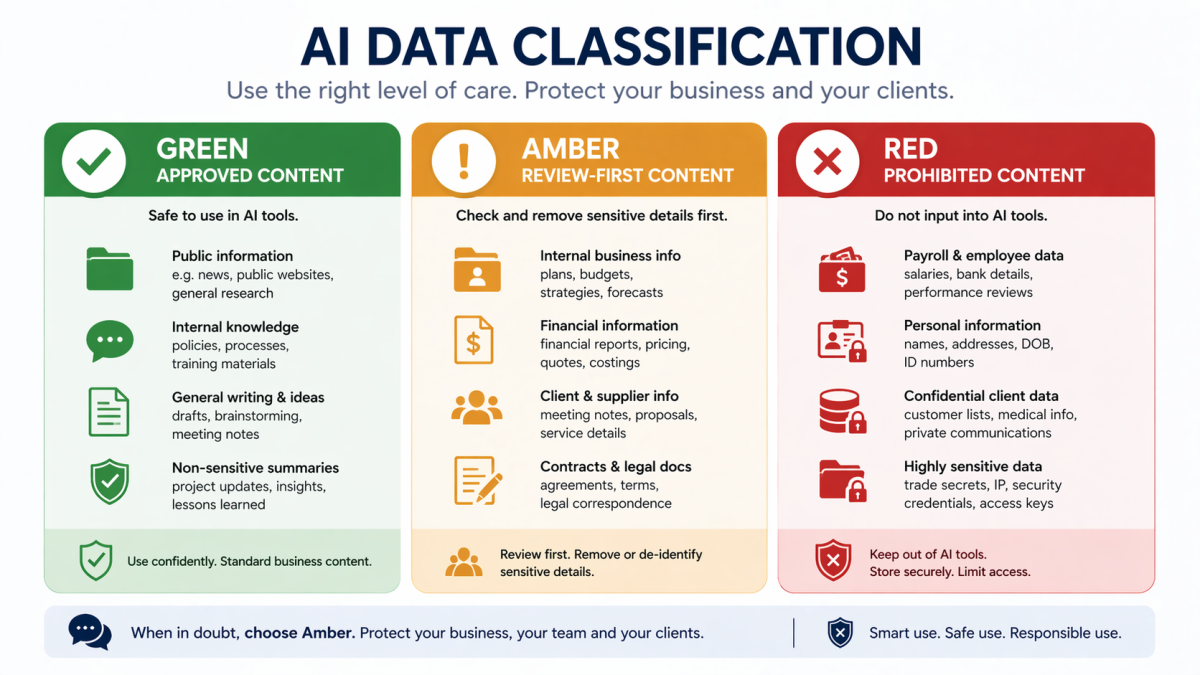
The best answer is not “use common sense.” The best answer is to create a classification model the business can actually use. For example:
- Green: non-sensitive internal drafting, brainstorming, formatting help
- Amber: business material that needs manager approval or anonymisation first
- Red: regulated, personal, legal, payroll, health, or confidential customer data
That framework gives staff something operational to work with when the answer is not obvious.
It also gives managers a consistent way to coach staff. Instead of debating every tool from scratch, they can anchor decisions to the same categories.
Where Royal IT fits
Most small businesses do not need a giant AI governance program. They need sensible operational guardrails. That is where a managed services and cyber-focused partner can help.
Royal IT can support businesses with:
- selecting safer approved AI tools
- reviewing Microsoft 365 and identity settings
- designing acceptable-use guidelines
- aligning AI use with existing managed IT services and cyber security support
- helping teams adopt AI in a way that improves productivity without creating avoidable privacy or security gaps
The aim is not to make AI feel scary. It is to make it governable.
The bottom line
By 2026, “we are still thinking about whether to use AI” is no longer a serious operating position for many SMBs. AI is already appearing in mainstream business tools and everyday workflows. The real decision is whether your business uses it with clear boundaries or leaves staff to improvise.
A practical AI policy gives you those boundaries. It protects sensitive information, reduces privacy mistakes, keeps human accountability where it belongs, and makes it easier to scale safe use over time.
If your team is already using ChatGPT, Copilot, or other AI tools in fragments, now is the right time to turn scattered behavior into an explicit policy. And if you want help designing a policy that staff will actually follow, Royal IT can help.
FAQ: AI Policy Small Business
Do small businesses really need a formal AI policy?
Yes. Even a short policy reduces confusion around approved tools, prohibited data, and review responsibilities.
Can staff use public AI tools for work?
Only if the business has explicitly approved them and the policy defines what data can and cannot be used.
Is an AI policy only about privacy?
No. It also covers security, accuracy, approvals, vendor risk, and accountability.
Should AI output always be reviewed?
For high-stakes, customer-facing, legal, financial, or sensitive work, yes. AI should support judgment, not replace it.
Can Royal IT help with Copilot governance as well as general AI policy?
Yes. That is often the most useful place to begin because Microsoft 365 adoption, identity, permissions, and AI policy all intersect.