

If you are planning a Microsoft 365 Copilot rollout in 2026, the biggest mistake is treating it like just another software add-on. Copilot changes how staff create content, search across work data, summarise conversations, and make decisions inside Word, Excel, Outlook, Teams, and PowerPoint. That can create real productivity gains, but only when the business, security, and governance groundwork is already in place.
Table of contents: This article covers why Microsoft 365 Copilot Business matters in 2026, who it suits, what must be ready before rollout, how to avoid governance mistakes, and what a practical phased rollout looks like for Perth SMBs.
For many Perth small and medium businesses, that is the real challenge. The issue is not whether AI sounds useful. It is whether your Microsoft 365 tenant is clean enough, your permissions are tight enough, your staff know what not to paste into prompts, and your leaders have a clear rollout plan instead of vague excitement. In early 2026, Microsoft made the SMB message very clear: AI and security now need to be approached together, not as separate projects.
This guide is written for business owners, operations managers, finance leaders, and internal IT contacts who want a practical view of what a successful rollout looks like. It is deliberately commercial and operational. The goal is not to describe flashy features. The goal is to help your business decide whether Copilot Business is worth doing now, how to do it properly, and where a local managed IT partner can reduce risk.
Why Copilot Business matters to businesses in 2026
Microsoft signalled the direction of travel on 29 January 2026, when it positioned Microsoft 365 Copilot Business and security together as a focused SMB opportunity. That matters because most businesses are not trying to become AI companies. They are trying to get more value from small teams, improve responsiveness, reduce repetitive work, and keep data under control while doing it.
Microsoft outlined the SMB direction for Copilot on 29 January 2026, and its current deployment requirements remain an important readiness check in Microsoft’s Copilot requirements guidance.
That is exactly where Copilot Business starts to make sense. It sits inside tools your staff already use every day. Instead of forcing another platform into the stack, it extends existing workflows:
- drafting emails in Outlook
- building proposals and reports in Word
- summarising meeting notes and next steps in Teams
- turning raw spreadsheet data into initial analysis in Excel
- accelerating internal presentations in PowerPoint
For a accounting firm, that might mean faster internal summaries and first-draft client communications. For a construction business, it could mean quicker meeting notes, job updates, and tender-response preparation. For a professional services team, it may reduce the time spent chasing old files and rewriting the same documents from scratch.
The opportunity is real, but so is the risk. If your Microsoft 365 environment contains messy permissions, overshared SharePoint libraries, legacy distribution groups, or inconsistent document naming, Copilot can surface the consequences of that poor hygiene very quickly. Good AI does not fix poor information management. It exposes it.
What Microsoft 365 Copilot Business actually is
There is still confusion in the market between consumer AI tools, standalone secure chat, and the broader Microsoft 365 Copilot experience. For Royal IT clients, the most important thing to understand is that Microsoft 365 Copilot Business is built for work. It is designed to operate within Microsoft 365 apps and in the context of your work data, subject to the permissions users already have.
That sounds simple, but it has major consequences.
If a user has access to the wrong data today, AI can help them reach it more easily tomorrow. If a user has access to the right data and the environment is well structured, AI can help them work much faster with less context-switching. So the product decision cannot be separated from governance, identity, licensing, and information architecture.
Microsoft’s current guidance for deployment highlights several hard requirements before rollout:
- a qualifying Microsoft 365 subscription
- an Exchange Online mailbox
- Entra ID identity
- supported operating systems and browsers
- required network access
Microsoft also strongly recommends surrounding controls such as SharePoint governance, Purview labeling, and a phased rollout model. That is a useful clue for local businesses. Even Microsoft is telling you not to treat Copilot as a blind all-users-on-day-one deployment.
Which SMBs should adopt Copilot Business first
Not every team gets the same value at the same time. The best early candidates tend to have four characteristics.
1. They already work heavily in Microsoft 365
If your team lives in Outlook, Teams, Word, Excel, and SharePoint, Copilot has a natural place to create value. If your core work happens mostly in specialist line-of-business software with minimal Microsoft 365 use, the ROI case is harder.
2. They produce repeatable knowledge work
Copilot performs best where there is a steady stream of routine but valuable work:
- proposals
- internal updates
- meeting summaries
- board papers
- status reports
- client emails
- spreadsheet analysis
The more often your team starts from a blank page, the more useful Copilot can become.
3. They have enough structure to govern access
A business with clean licensing, sensible security defaults, controlled sharing, and documented ownership over key SharePoint sites is in a far better position than a business with years of permission sprawl.
4. Leadership wants disciplined adoption, not novelty
The strongest deployments start when leaders ask practical questions:
- Which teams will save meaningful time?
- What data should never be pasted into prompts?
- How will we review output quality?
- What usage patterns count as success?
If the only reason for rollout is “everyone is talking about AI,” pause. That is not a deployment strategy.
Why microsoft 365 copilot business projects fail
In our experience, these rollouts usually go off track for familiar reasons.
Poor permission hygiene
Copilot respects the permissions users already have. That means oversharing does not stay invisible. It becomes more discoverable. If staff can already access folders they should not access, AI can accelerate that exposure.
No data classification rule
Many businesses still have no plain-language policy about what can and cannot be pasted into AI prompts. That creates immediate risk around payroll data, HR files, contracts, client financials, health information, or commercially sensitive documents.
No adoption model
Buying licenses is not the same as getting outcomes. Without role-based use cases, examples, and manager reinforcement, people either ignore the tool or use it in inconsistent ways that create more review work.
No security conversation
Microsoft itself is pairing AI with security for SMBs in 2026. That should tell you everything. AI adoption without identity protection, MFA discipline, endpoint hygiene, and information governance is a weak operating model.
No local support during change
When the first rollout questions arrive, businesses need fast answers. A local partner matters because adoption problems are rarely just licensing problems. They are workflow, permissions, device, browser, change-management, and user-support problems all at once.
A practical readiness checklist before rollout
Before you buy additional licenses for a wider group, work through this checklist.
Licensing and tenant readiness
- Confirm each intended user has an eligible Microsoft 365 plan.
- Confirm each intended user has an Exchange Online mailbox.
- Confirm sign-in, conditional access, and MFA are already enforced consistently.
- Confirm the browsers and devices used by staff are within supported requirements.
Identity and security
- Review privileged admin roles and remove stale access.
- Check MFA coverage for all priority users, especially executives and finance.
- Review risky legacy protocols and unnecessary exceptions.
- Make sure endpoint devices are patched and managed.
SharePoint and OneDrive hygiene
- Review which sites are broadly shared.
- Review external sharing settings.
- Review long-neglected team sites full of unmanaged documents.
- Identify locations that should not be exposed to broad knowledge discovery.
Information governance
- Decide what types of information should never be used in prompts without approval.
- Decide whether certain teams need stronger review or labeling controls.
- Document who approves AI use for customer-facing, legal, financial, or HR workflows.
Business use cases
- Define the first 5 to 10 use cases by role.
- Estimate time saved, quality uplift, or turnaround improvement.
- Decide what metrics will define success after 30, 60, and 90 days.
This is where a structured managed IT services partner is useful. The value is not just technical configuration. It is the ability to connect configuration with operations and staff behaviour.
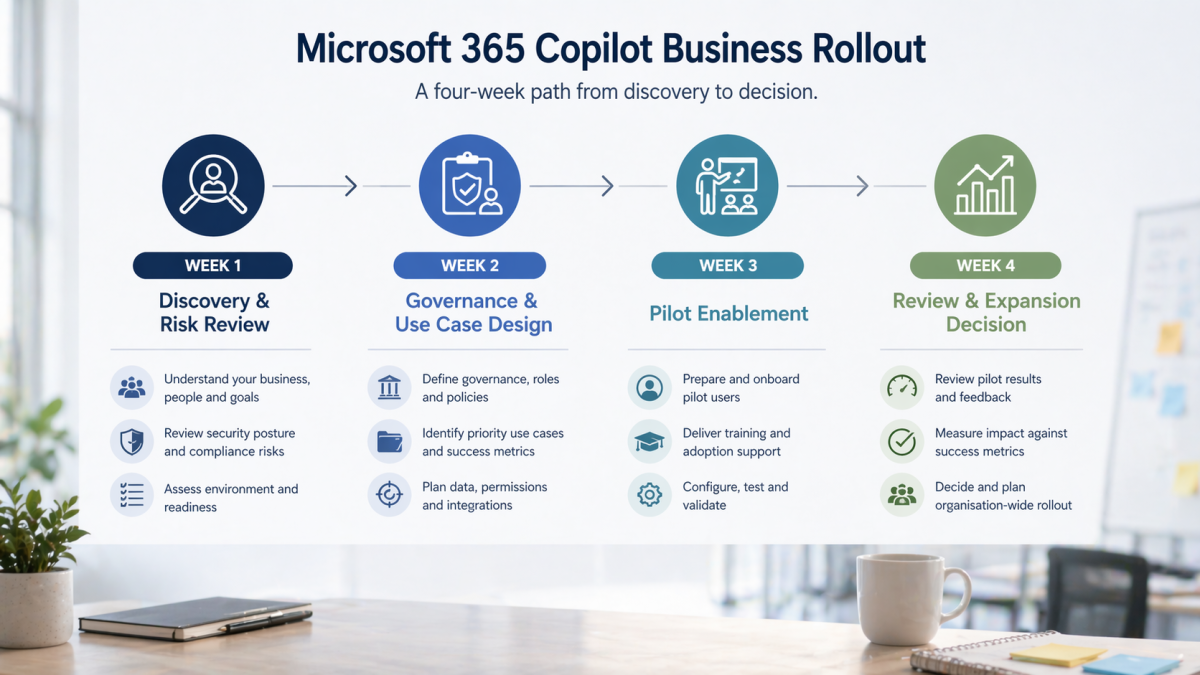
A 30-day rollout model that works
For most SMBs, a phased pilot is better than a broad release.
Week 1: Discovery and risk review
Start by selecting one pilot group. Good candidates are leadership, operations, customer service leads, project coordinators, and proposal-heavy teams. Then review:
- licensing
- mailboxes
- device state
- MFA coverage
- sensitive data locations
- obvious SharePoint permission problems
The goal is not to make the tenant perfect before starting. The goal is to avoid starting blind.
Week 2: Governance and use-case design
Create a short acceptable-use guideline that answers:
- what data is prohibited in prompts
- what requires human review
- what should not be sent externally without approval
- which vendor or internal knowledge sources should be treated as authoritative
At the same time, define role-based prompts and workflows. Staff need examples relevant to their jobs, not generic AI tips.
Week 3: Pilot enablement
Turn on the pilot group and support them closely. Give them 3 to 5 approved use cases each. Examples include:
- summarising internal meetings
- drafting first-pass client updates
- restructuring long documents
- extracting action items from Teams discussions
- producing first-draft Excel summaries
The key is to reduce blank-page work while keeping a human in control.
Week 4: Review and expansion decision
At the end of the first month, assess:
- actual usage
- quality of outputs
- time savings
- rework burden
- governance incidents
- user confidence
Then decide whether to expand, refine, or pause.
How to measure value after the first 90 days
One reason AI projects underperform is that businesses never define what success should look like after launch. They end up with stories instead of evidence. A better approach is to decide in advance what the pilot is meant to improve.
For most SMBs, useful metrics fall into 4 groups.
Productivity metrics
- time saved on recurring draft work
- faster turnaround for internal reports
- reduction in time spent searching for files or meeting context
- lower blank-page time for proposals and updates
Quality metrics
- fewer missed action items after meetings
- more consistent document structure
- stronger internal summaries
- reduced rewriting effort before approval
Adoption metrics
- active use by pilot staff
- repeat use in approved scenarios
- reduction in off-policy use of unapproved AI tools
- number of teams requesting expansion based on practical results
Governance metrics
- no prohibited data incidents
- clear escalation where uncertain prompts were stopped
- documented review on customer-facing output
- reduction in risky sharing or permission sprawl discovered during rollout
The point is not to turn a small pilot into an enterprise analytics exercise. The point is to avoid subjective decision-making. If a business cannot articulate where value appeared, it will struggle to know whether more licensing is justified.
What not to automate first
Another common mistake is asking Copilot to support high-risk work before the business has built good habits. In the first phase, avoid overreliance on AI for:
- legal interpretation
- contract redlining without review
- financial recommendations
- formal HR decisions
- public claims that require precise factual accuracy
Those use cases may become safer over time with better governance and stronger review, but they are poor starting points for most SMBs. The better early wins are low-drama, high-frequency tasks where the business can clearly compare before and after.
Common questions from WA decision-makers
Is Copilot Business worth it for small teams?
Sometimes yes, but only when the work profile fits. A business with heavy email, document, and meeting overhead can get value quickly. A business that mostly works in specialist apps with limited Microsoft 365 usage may need a different priority list first.
Will it replace staff?
That is the wrong framing for most SMBs. In practice, it is better understood as leverage. It helps capable staff move faster on repetitive work, but it still requires review, judgment, and process discipline.
Is it safe by default?
It is safer than pasting business data into random public AI tools, but safe by default is not the same as safe without governance. Your existing access model, identity controls, and document hygiene matter enormously.
Can we roll it out to everyone immediately?
You can, but it is usually a poor decision. Phased rollout gives you better adoption, fewer surprises, and better evidence for future licensing spend.
How Royal IT can help
Royal IT’s role is not to sell AI hype. It is to help businesses decide whether Copilot Business is commercially sensible, make sure the Microsoft 365 environment is ready enough to support it, and reduce the operational mess that often sits behind rushed deployments.
That can include:
- Microsoft 365 readiness review
- identity and MFA tightening
- permission and sharing review
- endpoint and browser readiness
- pilot design
- governance guidance
- user onboarding support
The best result is not “we switched AI on.” The best result is “we enabled the right people, reduced repetitive work, kept data under control, and created a repeatable path for broader rollout.”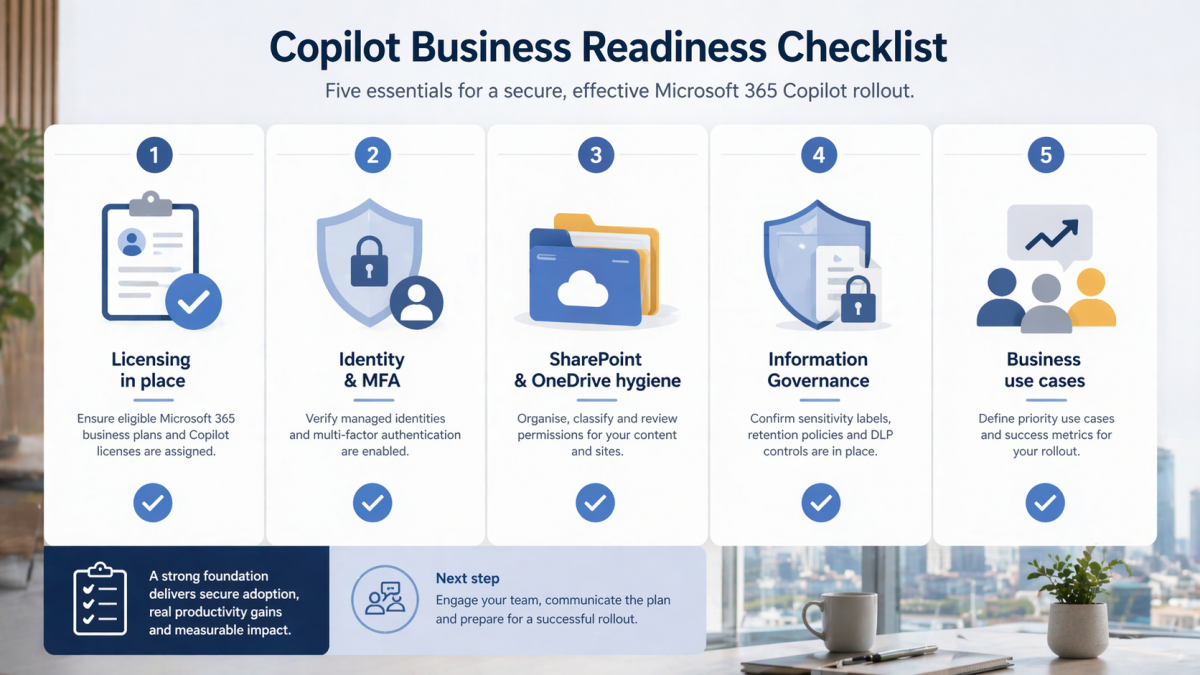
The bottom line
For the right business, Copilot Business can absolutely create value in 2026. But the businesses that benefit most are the ones that treat it as an operating model change, not a novelty feature. If your Microsoft 365 environment is reasonably mature, your leaders want measured adoption, and your team spends too much time producing routine knowledge work, now is a sensible time to plan.
If your environment is messy, permissions are loose, and nobody owns governance, the smarter move is to fix the foundations first and then roll Copilot out with confidence.
That is where a local partner can make the difference between an expensive experiment and a useful business capability. If you want a practical assessment of whether Copilot Business is right for your team, book a consultation with Royal IT.
FAQ: Microsoft 365 Copilot Business
What is the difference between Microsoft 365 Copilot Business and general AI chat tools?
Copilot Business is designed to work inside Microsoft 365 apps and in the context of business data users already have permission to access. General AI tools may not have the same business context, governance alignment, or admin controls.
Do businesses need to clean up SharePoint before rollout?
In most cases, yes. Copilot makes existing permissions and content structure more visible. If sites are overshared or badly organised, that should be addressed before wide rollout.
What is the best first pilot group?
Usually a small group of managers, operations staff, and document-heavy users who already work deeply in Microsoft 365 and can give structured feedback.
Does Copilot remove the need for user training?
No. Training becomes more important, not less. Staff need examples, boundaries, and review habits so that output quality remains high.
Should every user get a license on day one?
Usually no. A phased rollout is more cost-effective and reduces governance mistakes.