

The phrase windows 10 end of support perth business may sound like a technical search term, but for many organisations it is now a real operational issue. Microsoft support for Windows 10 ended on 14 October 2025. Devices still running Windows 10 can continue to function, but Microsoft no longer provides standard security updates, feature updates, or mainstream technical support for the operating system. That changes the risk profile immediately.
Table of contents: This guide explains what Windows 10 end of support means in 2026, the business risks of delay, how to audit your device fleet, and how Perth businesses can migrate with less disruption.
In 2026, the question is no longer whether the date is coming. The date has already passed. The practical question for Perth businesses is what they do now if they still have Windows 10 laptops, desktops, point-of-sale devices, or specialist systems in production. For some businesses, the answer is a straightforward Windows 11 rollout. For others, the challenge is more complex because of legacy software, old hardware, remote users, warehouse devices, or budget timing.
This article is written for business owners, operations managers, internal IT contacts, and finance leaders who need to move beyond generic “upgrade soon” advice. We will cover the immediate risks, how to prioritise devices, what to do with systems that cannot move quickly, and how to structure a migration project that reduces business disruption.
What Microsoft says as of 2026
Microsoft’s support guidance is clear: Windows 10 reached end of support on 14 October 2025. Microsoft recommends upgrading eligible devices to Windows 11 or replacing hardware that cannot support a modern Windows 11 deployment. Microsoft also notes that some users may rely on Extended Security Updates as a temporary bridge, but that should be treated as an interim step, not a long-term operating model.
There is another 2026 wrinkle that many businesses have missed. Microsoft also noted that Secure Boot certificates used by many Windows devices are set to begin expiring starting in June 2026. That does not mean every device will immediately fail, but it does reinforce a broader point: deferred lifecycle decisions create compounding complexity. Once a fleet is behind, more than one issue starts to stack up.
For local businesses, that means Windows 10 is no longer just an IT housekeeping task. It is now part of cyber risk management, procurement planning, and continuity planning.
Why delaying the move is riskier than it looks
The most dangerous assumption is that an old device is acceptable because “it still works.” Functionality is not the same as supportability. Many businesses only notice the true cost of delay after one of these events:
- a security incident exposes unsupported endpoints
- a line-of-business app vendor stops supporting the device environment
- a hardware failure forces an urgent replacement with no rollout plan
- remote users struggle with performance, battery, or compatibility
- insurers, auditors, or clients start asking lifecycle questions
Unsupported devices also create hidden operational drag. Help desk issues take longer to diagnose. Modern identity and security controls become harder to standardise. Staff experience becomes inconsistent. Procurement becomes reactive instead of planned.
And while Microsoft 365 apps may continue to run on Windows 10 for a period, Microsoft has already said support for Microsoft 365 Apps on Windows 10 ended when Windows 10 support ended, even though some security updates for Microsoft 365 on Windows 10 continue through October 2028. That nuance matters. The apps might still open, but “still opens” is not the same as “this is the right platform to keep using across the business.”
What a business should do first
Do not start with a blanket instruction telling everyone to upgrade. Start with visibility.
Build a real device inventory
At minimum, you need:
- device name
- assigned user
- physical location
- hardware age
- CPU and RAM
- storage health
- Windows version
- warranty status
- critical applications used on the device
- whether the device appears Windows 11 capable
This sounds basic, but many SMBs do not have it in a reliable form. Without it, you cannot sequence the project sensibly.
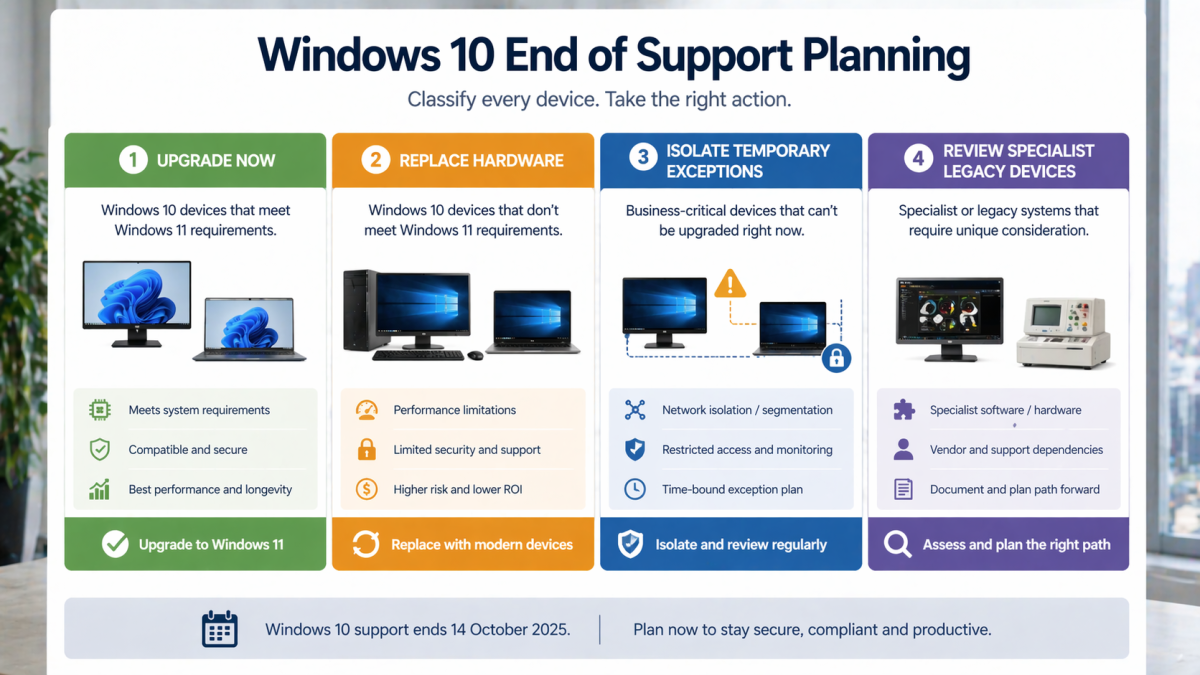
Sort devices into 4 groups
Group 1: Ready to upgrade now Devices that meet requirements, are actively used, and have no known application blockers.
Group 2: Needs testing first Devices that appear upgrade-capable, but are tied to finance software, CAD tools, production systems, or peripheral hardware that must be checked.
Group 3: Replace rather than upgrade Old hardware that may technically run a newer OS but will create a poor user experience or higher support burden.
Group 4: Exception devices Special-purpose systems, factory-floor PCs, kiosk devices, or legacy machines that require an interim strategy while the business decides what to do next.
This simple classification turns a stressful fleet-wide problem into a sequence of manageable actions.
A practical 2026 migration checklist
Below is the checklist we recommend for a windows 10 end of support business project.
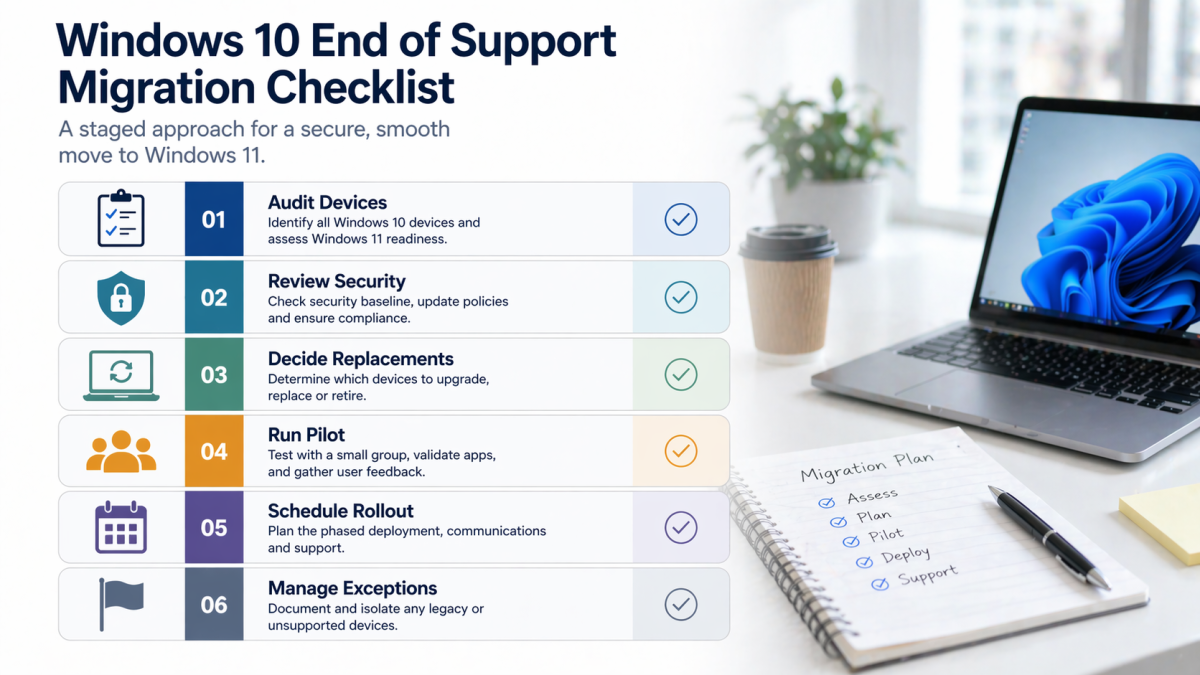
1. Confirm business priorities
Ask which teams cannot tolerate downtime, which devices are customer-facing, and which devices support finance, payroll, dispatch, stock, or operations. Criticality comes before convenience.
2. Identify the true blockers
Some migrations stall because the business assumes an application will not work on Windows 11 without ever testing it. Other migrations stall because there really is a driver, printer, scanner, or niche software problem. Separate evidence from assumption.
3. Audit identity and security before rollout
If devices are being touched anyway, use the project to improve:
- Microsoft Entra sign-in discipline
- multi-factor authentication
- local admin removal where appropriate
- endpoint protection consistency
- patching and device management
An OS migration is a missed opportunity if it only changes the wallpaper and version number.
4. Decide which devices to replace
This is often a finance conversation as much as a technical one. Some businesses hesitate because device replacement feels expensive. But the real comparison is not new hardware versus no cost. It is planned replacement versus rising support cost, lower performance, and reactive failure.
5. Run a pilot first
Choose a small group of users with different roles:
- administration
- finance
- sales
- operations
- a manager
Test application compatibility, print workflows, file access, sign-in experience, and meeting tools.
6. Schedule cutovers by team
Do not upgrade everyone randomly. Create a clear schedule with:
- pre-cutover backups
- user communication
- device handover steps
- post-upgrade validation
- support coverage for the first 48 hours
7. Deal with exceptions properly
If a device genuinely cannot move immediately, document:
- why it is an exception
- who owns the risk
- what compensating controls exist
- when it will be reviewed again
Exceptions are acceptable when they are visible and time-bound. They are dangerous when they are forgotten.
The most common mistakes businesses make
Waiting for a perfect time
There is rarely a perfect time. There is only a better time to plan and a worse time to react. Once support has ended, delay usually increases risk faster than it reduces inconvenience.
Treating the project as “just hardware”
This is a business systems project, not a shopping exercise. If your team relies on old local admin habits, inconsistent printers, undocumented software installs, or manually mapped drives, the migration will expose those issues.
Upgrading without user communication
People do not resist change just because they dislike new menus. They resist confusion. Explain the reason for the project, the expected benefits, the timing, and where support will come from.
Failing to standardise
Many SMBs end up with a messy half-state: some devices upgraded, some replaced, some unmanaged, some manually configured. Standardisation is one of the main benefits of doing the project properly. Protect it.
How to handle legacy applications and edge cases
Every business has at least one awkward exception. It might be a warehouse label printer, a line-of-business database tool, an old scanner driver, or software tied to a vendor that no longer exists.
The right response is not panic and it is not denial. It is structured decision-making.
Ask:
- Does the application have a supported modern version?
- Can the workflow move to a web or cloud equivalent?
- Can the task be isolated to a small number of controlled devices temporarily?
- Is the business carrying unnecessary risk by preserving the old workflow?
Sometimes the answer is to modernise immediately. Sometimes the answer is to isolate the legacy dependency and replace it as part of a separate project. But the worst answer is usually to let the exception control the whole fleet strategy.
This is where IT infrastructure solutions matter. Migration projects work best when device lifecycle, network policy, identity, endpoint protection, and line-of-business requirements are assessed together instead of in silos.
What businesses should budget for
The real budget is broader than laptop pricing.
You may need to account for:
- replacement devices
- docking stations or peripherals
- labour for migration and cutover
- testing time
- endpoint management cleanup
- application remediation
- user support
That sounds like a reason to delay. In reality, it is a reason to budget honestly. Businesses get into trouble when they under-budget a lifecycle project and then make rushed compromises halfway through.
The positive side is that a well-run migration can also simplify the environment. Standard builds reduce support effort. Better devices improve staff experience. Security settings become more consistent. Procurement becomes easier over the next refresh cycle.
A sensible rollout model for 2026
For most SMBs, the best model looks like this:
Phase 1: Assessment
- inventory devices
- identify blockers
- classify users and criticality
- confirm budget range
Phase 2: Pilot
- migrate a small representative cohort
- test business workflows
- refine the standard build
- document support steps
Phase 3: Priority rollout
- move high-value, low-complexity users first
- replace failing or high-risk hardware
- support teams through a planned schedule
Phase 4: Exceptions and cleanup
- isolate unresolved legacy systems
- remove unsupported devices where possible
- document remaining risk
- set the next review point
This structure reduces surprises and keeps the project commercially grounded.
How to communicate the change to staff
One of the easiest ways to create avoidable friction is to treat the migration as a purely technical exercise and leave staff to discover changes on the day. Good communication does not need to be dramatic, but it does need to be clear.
Before migration, staff should know:
- why the project matters
- when their device will be upgraded or replaced
- how long the cutover is expected to take
- what they need to do beforehand
- where to get help afterwards
For some users, the biggest concern is not the operating system itself. It is whether their files, printers, browser bookmarks, passwords, and line-of-business applications will still work. Address those concerns directly in user communication and in the pilot design.
This is also a useful moment to set better technology expectations more broadly. If the business is moving to a more standardised, better-managed environment, explain what that means in practical terms:
- faster support
- more consistent security
- better performance
- fewer ad hoc workarounds
That helps the project feel like an improvement program instead of an imposed inconvenience.
What to do with retired hardware
Retired devices should not drift into a cupboard with no documented outcome. The business should decide whether each device will be:
- securely wiped and recycled
- reassigned for a lower-risk use case
- held briefly as controlled fallback stock
- traded in through an approved channel
What matters most is that old devices are not left holding recoverable business data without ownership or controls. Secure decommissioning is part of the lifecycle, not an afterthought.
Why a local partner helps
There is a practical difference between generic remote advice and local business support. companies often run lean teams, mixed office environments, and a patchwork of old and new systems. They need migration support that understands the real-world mix of office users, warehouse or workshop devices, finance workflows, printers, scanners, remote access, and onsite troubleshooting.
Royal IT can help with:
- device fleet assessment
- Windows 11 readiness review
- migration planning
- staging and deployment
- endpoint standardisation
- post-cutover support
Most importantly, Royal IT can help businesses make decisions before the problem becomes an emergency.

The bottom line
Windows 10 end of support is no longer a future event. It is a present-tense operational issue. The businesses that handle it best in 2026 will not necessarily be the ones with the largest IT teams. They will be the ones that create visibility, prioritise sensibly, and move with a structured plan.
If you still have a meaningful number of Windows 10 devices in production, now is the time to assess, classify, and sequence your response. Some devices can move quickly. Some need testing. Some should be replaced. A few may need a short-term exception. But none of those decisions should remain vague.
If you want help turning your current device fleet into a practical migration plan, speak with Royal IT.
FAQ: Windows 10 End of Support Business
Can we keep using Windows 10 in 2026?
Devices will still run, but standard support ended on 14 October 2025. That means higher security and support risk.
Do all devices need to be replaced?
No. Some devices can be upgraded to Windows 11. Others should be replaced because of age, hardware limitations, or supportability.
What if one critical application is holding us back?
Treat that application as an exception to be assessed and contained, rather than allowing it to delay the whole device fleet.
Is this only an IT issue?
No. It affects cyber risk, staff productivity, procurement planning, and operational continuity.
Should we run a pilot first?
Yes. A pilot reduces surprises and helps define a supportable standard build before broader rollout.